
Watchlists & Sanctions: Business Search
Watchlist Screening in Business Search
Sanctions and watchlist screening is a critical compliance requirement for financial institutions, fintech companies, and businesses handling payments or extending credit. This guide explains how Baselayer performs watchlist checks as part of every Business Search, where to find results in the API response, and how to interpret them for your compliance workflows.
For a deeper understanding of sanctions compliance concepts, see the Watchlists, Sanctions & Compliance Screening guide. For standalone sanctions and PEP checks outside of Business Search, see the Watchlists & Sanctions: Standalone Checks guide.
How Watchlist Screening Works in Business Search
Baselayer automatically performs watchlist screening as part of every Business Search. No additional configuration is required — screening runs by default when you submit a search.
Baselayer screens applications against a number of sanction lists. All sanction lists are updated daily.
What Gets Checked
When you submit a Business Search, Baselayer runs watchlist checks on:
- Business name submitted in the search request
- Alternative business names submitted via the
alternative_namesfield (if provided) - Officer names submitted via the
officer_namesfield (if provided) - Business legal name found in the Baselayer business profile (from Secretary of State records)
- Alternative business names found in the Baselayer business profile (from Secretary of State records)
- All officers identified in the Baselayer business profile (from SoS records and other sources)
This means even if you don't provide officer names or alternative business names in your search input, Baselayer will still screen any names and officers it identifies in the business profile against all applicable watchlists.
Watchlists Scanned
Every Business Search screens against the following official government watchlists:
| List | Abbreviation | Administering Agency |
|---|---|---|
| Specially Designated Nationals | SDN | OFAC (Treasury) |
| Sectoral Sanctions Identifications List | SSI | OFAC (Treasury) |
| Capta List | CAP | OFAC (Treasury) |
| Foreign Sanctions Evaders | FSE | OFAC (Treasury) |
| Non-SDN Menu-Based Sanctions | NS-MBS | OFAC (Treasury) |
| Non-SDN Iranian Sanctions Act | NS-ISA | OFAC (Treasury) |
| Non-SDN Chinese Military-Industrial Complex Companies | NS-CMIC | OFAC (Treasury) |
| Non-SDN Palestinian Legislative Council | PLC | OFAC (Treasury) |
| U.S. FinCEN Section 311 - Special Measures List | FINCEN-311 | U.S. Financial Crimes Enforcement Network* |
| Entity List | EL | Bureau of Industry and Security |
| Denied Persons List | DPL | Bureau of Industry and Security |
| Military End User List | MEU | Bureau of Industry and Security |
| Unverified List | UVL | Bureau of Industry and Security |
| ITAR Debarred | DTC | State Department |
| Nonproliferation Sanctions | ISN | State Department |
| Politically Exposed Persons** | PEP | Multiple sources |
| FBI Most Wanted / Criminal Lists | FBI | FBI |
| HHS OIG List of Excluded Individuals/Entities | LEIE | HHS Office of Inspector General |
| IRS Exempt Organizations | IEO | Internal Revenue Service |
| Consolidated Canadian Autonomous Sanctions List | CNS | Government of Canada |
*Checks against U.S. FinCEN Special Measures List are included under Baselayer OFAC checks.
For a detailed explanation of each list and its compliance implications, see the Watchlists, Sanctions & Compliance Screening guide.
Baselayer summarizes the above individual lists in the below umbrella categories (OFAC, CSL, etc.):
| Code | Full Name | Status |
|---|---|---|
| OFAC | Dept. of Treasury, Office of Foreign Assets Control | Always runs automatically |
| CSL | Dept. of Commerce, Consolidated Screening List | Always runs automatically |
| CNS | Consolidated Canadian Autonomous Sanctions List | Always runs automatically |
| FBI | FBI Wanted List | Always runs automatically |
| OIG | HHS OIG List of Excluded Individuals/Entities (LEIE) | Always runs automatically |
| IEO | IRS Exempt Organizations List | Runs when TIN is provided |
| PEP | Politically Exposed Persons | Runs when Order.Pep option is included |
| BFC | Baselayer Fraud Consortium | Consortium members only |
Automatic Checks
Five watchlists run automatically with every Business Search: OFAC, CSL, CNS, FBI, and OIG. No additional configuration or input is required.
Conditional Checks
Two watchlist checks require specific conditions:
IEO (IRS Exempt Organizations) — Only runs when a tin is provided in the search request. If you need IEO screening, include the business's TIN in your search.
PEP (Politically Exposed Persons) — Only runs when Order.Pep is included in the search options:
{
  "name": "Acme Corporation",
  "address": "123 Main St, New York, NY 10001",
  "options": ["Order.Pep"]
}
Without this option, PEP checks will not be performed. If you are onboarding high-value customers or operating in regulated industries (banking, crypto, lending), consider always including Order.Pep in your search options.
BFC (Baselayer Fraud Consortium) — Returned only to organizations with an active consortium membership, a contractual data-sharing arrangement — it is not an API order option. BFC also behaves differently from every other list: it is never emitted as a count: 0 placeholder. If your organization is not a member, the BFC entry is entirely absent from watchlist_hits — a zero-count row would falsely assert the business had been screened against the consortium, so absence means "not screened", not "clean". BFC hits never appear in sandbox under any configuration. See The Baselayer Fraud Consortium to learn about membership.
Understanding the Response
When Baselayer returns a Business Search response, watchlist results appear in two separate locations. Understanding this structure is essential for correctly identifying all potential matches.
1. Top-Level watchlist_hits (Search-Level)
watchlist_hits (Search-Level)The top-level watchlist_hits array contains matches for the data you submitted in your search request: the business name, alternative names, and officer names you provided.
{
  "id": "search-id-123",
  "name": "11420 CORP.",
  "address": "5599 NW 23rd Ave, Boca Raton, FL 33496",
  "tin": "270746046",
  "watchlist_hits": [
    {
      "code": "OFAC",
      "name": "Department of Treasury, Office of Foreign Assets Control",
      "count": 2,
      "details": [...]
    }
  ],
  "business": {...}
}
2. Business-Level watchlist_hits (Profile-Level)
watchlist_hits (Profile-Level)The watchlist_hits array nested inside the business object contains matches for data found in Baselayer's business profile: the business's legal name, alternative names from Secretary of State records, and officers identified from SoS records and other sources.
{
  "business": {
    "id": "business-id-456",
    "name": "11420 CORP.",
    "watchlist_hits": [
      {
        "code": "CSL",
        "name": "Department of Commerce, Consolidated Screening List",
        "count": 1,
        "details": [...]
      }
    ]
  }
}
Why Two Locations?
The two arrays answer different questions and contain different data:
- Search-level (
watchlist_hits) — what this search screened: the business name,alternative_names, andofficer_namesyou submitted, evaluated at the moment the search ran (point-in-time). This is also where IEO results appear. - Business-level (
business.watchlist_hits) — what Baselayer knows about the business entity: the resolved legal name, alternative names, and officers from Secretary of State records. This view is cumulative across searches of the same business, and it is also where Death Master File (DMF) results appear.
Because the two arrays screen different names at different points in time, do not deduplicate or merge them — consume both. If either location shows a count > 0, that's a compliance flag. A count of 0 means the name was screened against that list and came back clean.
Important: No Split Between Business Names and Officers
Within each watchlist_hits array, matches are not separated by type. Business names, alternative names, and officer names all appear together in the same list. For example, if the business name matches OFAC and one of its officers also matches OFAC, you'll see both in the same details array with a count of 2.
Visual Representation in the Console
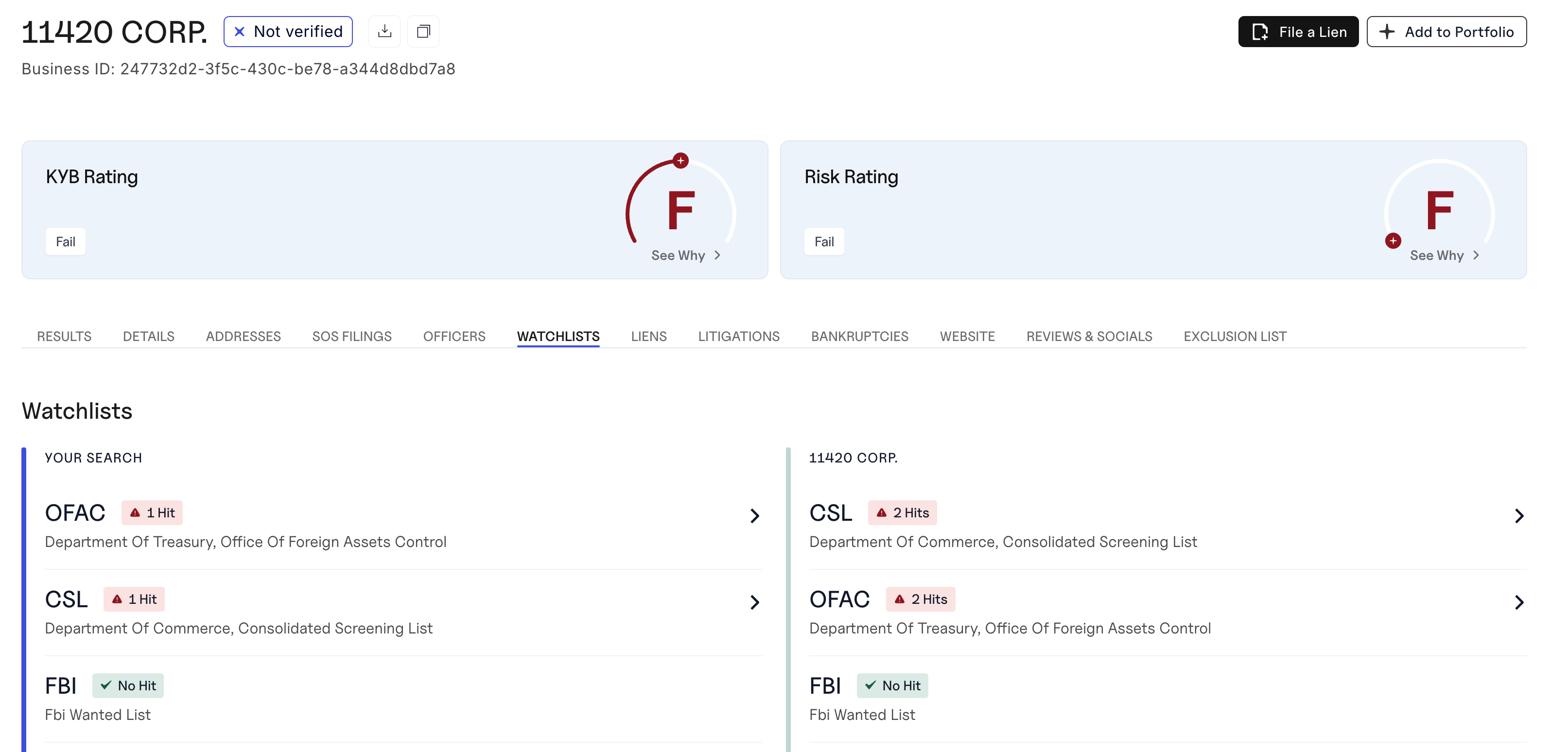
In the Baselayer Console, watchlist results are displayed side-by-side:
- Left panel: "Your Search" — shows matches for the data you submitted
- Right panel: "Business Name" — shows matches for the Baselayer business profile
This mirrors the two-location structure in the API response.
Reading Watchlist Results
Structure of a Watchlist Hit
Each entry in the watchlist_hits array is an envelope with four fields:
code: The short watchlist identifier (OFAC, PEP, CSL, BFC, etc.)name: Human-readable name of the watchlistcount: Number of matches found (0 means the name was screened against that list and no matches were found)details: Array of individual match objects. The shape of these objects is specific to each list — every list carries different fields, so parsedetailsper list rather than assuming one universal schema.
Example: An OFAC Hit
OFAC details objects currently carry the following fields:
{
  "code": "OFAC",
  "name": "Department of Treasury, Office of Foreign Assets Control",
  "count": 1,
  "details": [
    {
      "name": "SARRIA DIAZ, Rafael Alfredo",
      "alternative_names": ["SARRIA-DIAZ, Rafael A", "SARRIA, Rafael"],
      "program": "VENEZUELA",
      "title": null,
      "remarks": "DOB 08 Nov 1965; POB Caracas, Venezuela.",
      "source": "SDN",
      "entity_number": "24427",
      "type": "Individual",
      "addresses": [
        "5599 NW 23rd Avenue, Boca Raton, FL, 33496, US"
      ],
      "source_list_url": "https://sanctionslist.ofac.treas.gov/Home/SdnList",
      "source_information_url": "https://ofac.treasury.gov/sanctions-list-service"
    }
  ]
}
OFAC Detail Fields
name: The watchlist entry's listed namealternative_names: Known aliases (list of strings)program: The sanctions program the entry belongs to (e.g.,"SDGT","VENEZUELA"). Note this field is singular (program, a string) for OFAC; only CSL match objects useprograms(plural)title: The listed individual's title, if anyremarks: The Treasury SDN remarks text — often contains DOB, POB, and other identifying details useful for clearing false positivessource: Which OFAC-scope list the match came from:"SDN","NON_SDN", or"FINCEN_311"(may be null)entity_number: The OFAC entity number, as a string, ornull(FinCEN 311 rows carry no entity number)type:"Individual"or"Entity"addresses: A list of strings. For OFAC it contains zero or one element, because the source publishes a single concatenated address string per entrysource_list_url/source_information_url: Links to the official source list and its documentation
Detail Fields Vary by List — and Can Grow
Treat every key in a details object as optional-and-growing: write your parser to tolerate missing keys and ignore unknown ones.
- Hits are frozen at screening time. A watchlist hit permanently stores the detail shape that was current when the search ran. OFAC hits recorded before late May 2026 carry an older five-field shape (
name,alternative_names,program,title,remarks) — they will not be backfilled. New searches return the full shape shown above. - Addresses differ by list. PEP, CSL, and OIG
addressesare also lists of strings but can contain multiple elements (and can benullfor CSL and OIG). FBI and CNS match objects have no address field at all. Addresses are always lists of plain strings — never lists of objects.
Identifying Matches
Any watchlist entry where count > 0 indicates a positive match requiring review. Even if only one name matches, this is a compliance flag that must be investigated.
The Similarity Threshold
Baselayer uses fuzzy name matching to identify potential watchlist matches. Because names can be spelled differently, abbreviated, or contain typos, exact string matching would miss many legitimate matches.
Default Thresholds
For Business Search requests, Baselayer uses the following default similarity thresholds to ensure comprehensive coverage:
| Watchlist | Default Similarity Threshold |
|---|---|
| OFAC, CSL, CNS, FBI, OIG, IEO, PEP (Politically Exposed Persons) | 0.95 (95%) |
Custom Thresholds
Baselayer can configure custom similarity thresholds per customer account. It's common for customers to request stricter thresholds (to reduce false positives) or looser thresholds (to maximize coverage) depending on their risk appetite and regulatory requirements.
Custom threshold changes are applied upon written request and confirmed in writing by Baselayer.
Choosing the Right Threshold
The default of 0.95 works well for most organizations, providing comprehensive coverage while keeping false positives manageable. Consider adjusting based on your risk tolerance:
- Stricter thresholds (0.95+): Fewer false positives requiring manual review, but may miss legitimate matches with significant name variations
- Looser thresholds (0.6–0.8): Maximum coverage for high-risk use cases, but expect more false positives
Contact your Baselayer account representative to discuss threshold adjustments for your account.
Screening Configuration and Compliance Documentation
For auditors, examiners, and compliance teams, Baselayer can provide written confirmation of the screening configuration applied to your account. This documentation typically includes:
- Which watchlists are scanned — A full list of all watchlists included in every Business Search, along with their run conditions (automatic vs. conditional)
- Similarity thresholds — The configured match sensitivity for each watchlist
- What names are screened — Confirmation that business names, alternative names, and all identified officers are screened against all applicable watchlists
- Change control — Confirmation that settings are only modified upon explicit written request
This documentation is designed to satisfy auditor and examiner inquiries about your sanctions screening program. Contact your Baselayer account representative to request a screening configuration confirmation for your account.
Implementation: Checking for Watchlist Hits
def has_watchlist_hits(search_response):
    """
    Check if there are any watchlist matches at either the search
    or business level.

    Returns: (bool, list of watchlist codes with hits)
    """
    hits = []

    # Check search-level watchlist hits
    for watchlist in search_response.get('watchlist_hits', []):
        if watchlist.get('count', 0) > 0:
            hits.append(watchlist['code'])

    # Check business-level watchlist hits
    business = search_response.get('business', {})
    for watchlist in business.get('watchlist_hits', []):
        if watchlist.get('count', 0) > 0:
            hits.append(watchlist['code'])

    return len(hits) > 0, hits

# Usage
search_response = {}  # Your Business Search response
has_hits, watchlist_codes = has_watchlist_hits(search_response)

if has_hits:
    print(f"⚠️ Watchlist hits found: {', '.join(watchlist_codes)}")
    # Trigger manual review or reject
else:
    print("✅ No watchlist hits")
Best Practices
Always check both response locations. Don't just check the top-level watchlist_hits — also check the business.watchlist_hits array. A match in either location is a compliance flag.
Treat any count > 0 as a flag. Even a single match requires investigation. Don't ignore low counts.
Review the details. Don't stop at the count — examine the details array to understand what matched, which sanctions program it's tied to, and the associated addresses and alternative names. This context helps you determine if it's a true match or a false positive.
Consider match type. Matches marked as "type": "Individual" are people, while "type": "Entity" are businesses. This distinction matters for your review process.
Use PEP checks for higher-risk scenarios. If you're onboarding high-value customers or operating in regulated industries, always include Order.Pep in your search options.
Handle false positives gracefully. Not every match is a true positive. Common false positives include common names, similar business names in different industries, and entities with the same name but different locations. Always investigate before rejecting.
Keep records. Log all watchlist screening results, including timestamp, input data, and match details. Regulators may require proof of screening.
Don't rely solely on automated screening. Watchlist screening is part of a broader compliance program. Combine it with manual review for positive matches, enhanced due diligence for high-risk matches, and ongoing monitoring via Portfolio Monitoring.
Next Steps
- Learn the fundamentals: Read Watchlists, Sanctions & Compliance Screening for compliance concepts
- Run standalone checks: See Standalone Sanctions & PEP Checks for independent screening outside of Business Search
- Explore Business Search: See the Business Search Guide for full API details
- Set up monitoring: Use Portfolio Monitoring to continuously screen your customer base
Updated 6 days ago