
Getting Started with Baselayer API
Understanding how Baselayer products connect and flow together.
Baselayer's API is designed as a waterfall architecture - products build on each other to create a complete business profile. This guide explains how the pieces connect.
The Waterfall Model
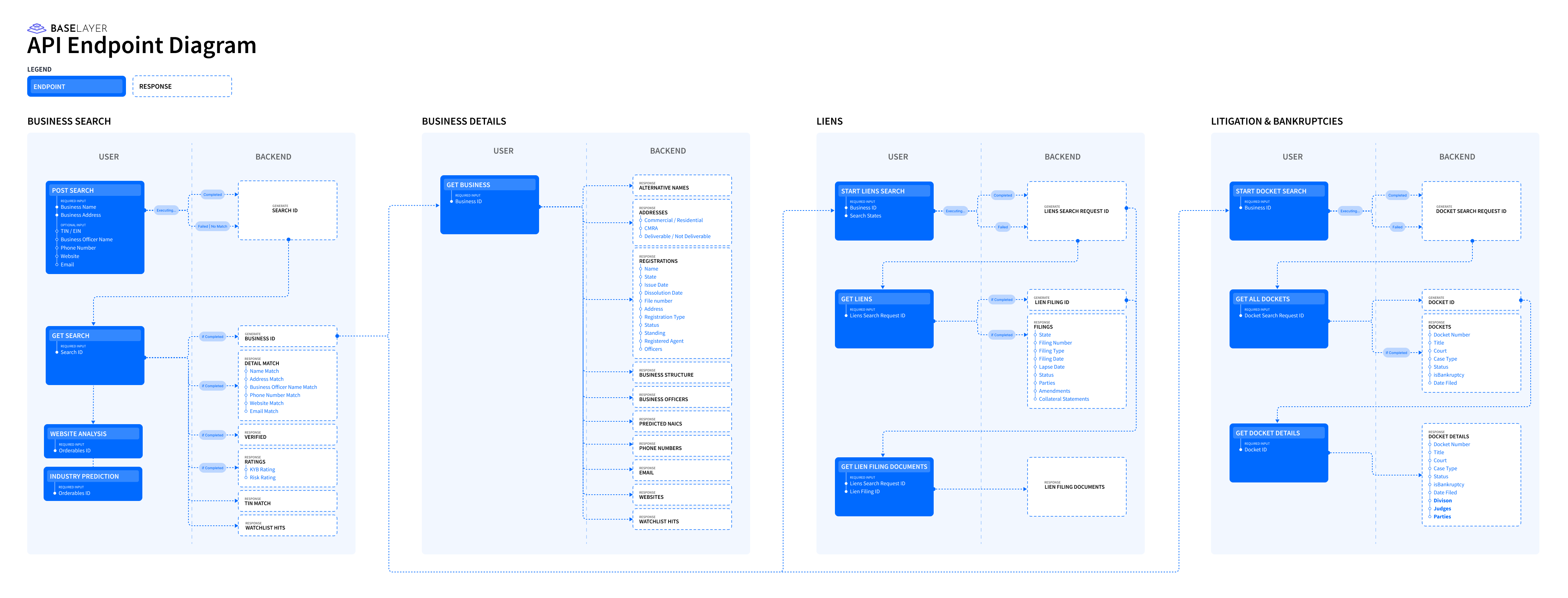
Mapping of Baselayer API
While Baselayer offers independent API routes for each product (Business Search, Online Presence, Liens Search, etc.), the platform is best understood as a waterfall flow:
- Start with Business Search - This is your foundation
- Get a verified
business_id- This unlocks everything else - Branch to specialized products - Use the
business_idto access liens, litigation, monitoring, etc.
Each product can work standalone, but they're designed to work together.
Understanding Key IDs
Baselayer uses different ID types to organize data. Understanding these IDs is essential for navigating the API.
| ID Type | Purpose | When You Get It | What It Unlocks |
|---|---|---|---|
| search_id | Identifies a Business Search request | Returned immediately from POST /searches | Check search status, retrieve results via GET /searches/{search_id} |
| business_id | Identifies a verified business entity | Included in completed search results (under business.id) | Access full business data via GET /businesses/{business_id}, initiate liens/litigation searches, add to portfolio monitoring |
| liens_search_request_id | Identifies a Lien Search request | Returned from POST /lien_searches | Check liens search status, retrieve results |
| filing_id | Identifies a specific lien filing | Returned in liens search results | Retrieve detailed filing information via GET /lien_filings/{filing_id} |
| docket_search_request_id | Identifies a Litigation/Bankruptcy Search request | Returned from POST /docket_searches | Check litigation search status, retrieve case list |
| docket_id | Identifies a specific court case | Returned in docket search results | Retrieve case details, exhibits, documents |
Key Insight: The business_id is your gateway. Once you have it from a Business Search, you can access all other Baselayer products for that business.
Note on Baselayer IDs: Everything in Baselayer has a unique identifier: addresses, registrations, officers, lien filings, court cases, and more. These IDs enable:
- Direct retrieval: use
GET /addresses/{address_id},GET /registrations/{registration_id}, etc. to fetch specific objects - Network tracking: follow activity and relationships across the Baselayer identity network
- Persistent references: store IDs to retrieve updated information at any time
If you persist these IDs in your system, you can always retrieve the latest data for that specific object.
The Basic Flow
Step 1: Initiate a Business Search
Start with a Business Search. Minimum required fields are name and address (freeform).
curl --request POST \
  --url https://api.baselayer.com/searches \
  --header 'X-API-Key: your_api_key_here' \
  --header 'Content-Type: application/json' \
  --data '{
    "name": "Baselayer Technologies Inc",
    "address": "149 New Montgomery St, San Francisco, CA 94105"
  }'
Response (2xx Accepted):
{
  "id": "a1b2c3d4-5678-90ab-cdef-1234567890ab",  // search_id
  "state": "PENDING",
  "created_at": "2025-12-29T10:15:30Z"
}
The API immediately returns a search_id and begins processing asynchronously.
Step 2: Get Results via Webhook or Polling
Recommended: Use Webhooks
When the search completes (typically 3-5 seconds without options), you'll receive a BusinessSearch.completed webhook:
{
  "__event__": {
    "type": "BusinessSearch.completed"
  },
  "id": "a1b2c3d4-5678-90ab-cdef-1234567890ab",  // search_id
  "state": "COMPLETED",
  "business": {
    "id": "b9c8d7e6-1234-5678-90ab-fedcba098765",  // business_id ← Save this!
    "name": "Baselayer Technologies Inc",
    "registration": { ... },
    "officers": [ ... ],
    "addresses": [ ... ],
    "scores": [ ... ]
    // Full business profile included here
  }
}
The search response contains the complete business profile - you have everything you need to make underwriting decisions or initiate additional searches.
Alternative: Poll the Search Status
curl --request GET \
  --url https://api.baselayer.com/searches/a1b2c3d4-5678-90ab-cdef-1234567890ab \
  --header 'X-API-Key: your_api_key_here'
See the Webhooks guide for setup details.
Step 3: Branch to Specialized Products
Now you can use the business_id from the search results to access other Baselayer products:
Lien Search
curl --request POST \
  --url https://api.baselayer.com/lien_searches \
  --header 'X-API-Key: your_api_key_here' \
  --header 'Content-Type: application/json' \
  --data '{
    "business_id": "b9c8d7e6-1234-5678-90ab-fedcba098765"
  }'
Returns a liens_search_request_id and processes asynchronously. Results include all found liens, each with its own filing_id.
Litigation/Bankruptcy Search
curl --request POST \
  --url https://api.baselayer.com/docket_searches \
  --header 'X-API-Key: your_api_key_here' \
  --header 'Content-Type: application/json' \
  --data '{
    "business_id": "b9c8d7e6-1234-5678-90ab-fedcba098765"
  }'
Returns a docket_search_request_id and processes asynchronously. Results include all found cases, each with its own docket_id.
Portfolio Monitoring
Add the search to ongoing monitoring:
curl --request POST \
  --url https://api.baselayer.com/portfolio/items \
  --header 'X-API-Key: your_api_key_here' \
  --header 'Content-Type: application/json' \
  --data '{
    "search_id": "a1b2c3d4-5678-90ab-cdef-1234567890ab"
  }'
See the Portfolio Monitoring guide for details.
Complete Flow Example
Here's how a typical integration looks from start to finish:
import requests
import time

API_KEY = "your_api_key_here"
BASE_URL = "https://api.baselayer.com"

# Step 1: Create business search
response = requests.post(
    f"{BASE_URL}/searches",
    headers={"X-API-Key": API_KEY, "Content-Type": "application/json"},
    json={
        "name": "Baselayer Technologies Inc",
        "address": "149 New Montgomery St, San Francisco, CA 94105"
    }
)
search_id = response.json()["id"]
print(f"Search initiated: {search_id}")

# Step 2: Wait for webhook OR poll for completion
time.sleep(5)  # Wait for processing (3-5 seconds without options)

search_result = requests.get(
    f"{BASE_URL}/searches/{search_id}",
    headers={"X-API-Key": API_KEY}
).json()

if search_result["state"] == "COMPLETED":
    # Business data is included in the search result
    business = search_result["business"]
    business_id = business["id"]
    print(f"Business verified: {business_id}")
    print(f"Business name: {business['name']}")

    # Step 3: Branch to other products using business_id
    # Example: Search for liens
    liens_response = requests.post(
        f"{BASE_URL}/liens_searches",
        headers={"X-API-Key": API_KEY, "Content-Type": "application/json"},
        json={"business_id": business_id}
    )
    liens_search_id = liens_response.json()["id"]
    print(f"Liens search initiated: {liens_search_id}")

    # Example: Add to portfolio monitoring
    portfolio_response = requests.post(
        f"{BASE_URL}/portfolio/items",
        headers={"X-API-Key": API_KEY, "Content-Type": "application/json"},
        json={
            "search_id": search_id
        }
    )
    print(f"Added to portfolio monitoring")
When to Use Each Product
Always Start Here
Business Search - Your foundation for all other products. Provides:
- Secretary of State registration verification
- IRS TIN matching
- OFAC/sanctions screening
- Business identity and structure
- Officer information
- Risk scoring
Optional Add-Ons (use business_id from search)
Lien Search - When you need collateral or credit risk assessment
- UCC liens (secured lending)
- Tax liens (unpaid obligations)
- Judgment liens
See: Lien Search guide
Litigation & Bankruptcy Search - When underwriting requires court record review
- Federal and state court cases
- Bankruptcy filings (Chapter 7, 11, 13)
- Case details and exhibits
Portfolio Monitoring - For ongoing risk management of existing customers
- Note: portfolio monitoring uses
search_id, not thebusiness_id, for the API request - Automatic monitoring for changes and customizable alerting
- SoS status updates, new liens, bankruptcies, sanctions hits
See: Portfolio Monitoring guide
Standalone Products (don't require business_id)
TIN Verification - Standalone IRS validation
- Can be used independently from Business Search
- Real-time verification
- Commonly used to verify the SSN of officers or sole proprietorships
Online Presence (Industry Prediction, Website Analysis, Socials & Reviews) - Can be ordered as part of Business Search or standalone
- Website discovery and analysis
- Industry classification (NAICS, MCC, SIC)
- Digital legitimacy signals
See: Online Presence: Basics guide for Web Presence options
OFAC/Watchlist Screening - Included in Business Search or available standalone
- Multiple sanctions and watchlists
- PEP screening
Important Concepts
Asynchronous by Default
Most Baselayer products are asynchronous - they return immediately with a request ID, then process in the background and notify you via webhook when complete.
Why? Operations vary in complexity:
- Basic Business Search: 3-5 seconds (without additional options)
- Other products (liens search or docket search): 2-10 seconds
- Specialized online presence products: 15-60 seconds
Exception: Business Search supports synchronous mode for immediate results using the Accept: application/vnd.osiris.sync+json header. This returns results in 3-5 seconds without requiring webhooks.
See: Webhooks at Baselayer and Asynchronous vs. Synchronous API
Quick Reference: Common API Patterns
Pattern 1: Simple Business Verification
1. POST /searches (get search_id)
2. Wait for BusinessSearch.completed webhook
3. Extract business_id and use results
Pattern 2: Business Verification + Liens
1. POST /searches (get search_id)
2. Wait for BusinessSearch.completed webhook
3. Extract business_id
4. POST /lien_searches with business_id
5. Wait for LiensSearch.completed webhook
6. Process lien results
Pattern 3: Business Verification + Monitoring
1. POST /searches (get search_id)
2. Wait for BusinessSearch.completed webhook
3. Extract business_id
4. POST /portfolio/items with search_id
5. Set up monitoring policy and notification subscriptions
Next Steps
Now that you understand how Baselayer products connect, you're ready to:
- Set up authentication: Authentication guide
- Configure webhooks: Webhooks at Baselayer
- Choose your environment: Sandbox vs. Production
- Start with Business Search: Business Search guide
For detailed API specifications and request/response schemas, see the API Reference.
For questions about implementation or integration support, contact your Baselayer account manager.
Updated 7 days ago