
Sandbox vs. Production Environments
A practical guide to understanding the differences between Baselayer's sandbox and production environments.
What Are Sandbox and Production Environments?
Baselayer provides two separate environments for using our Business Verification platform:
- Sandbox: A safe testing environment with pre-defined data that lets you integrate and test Baselayer without any risk or cost
- Production: The live environment where you verify real businesses and your usage is billed
The One Critical Difference: Your API Key
Everything else is identical between sandbox and production - same URLs, same API endpoints, same response formats. The only thing that determines which environment you're using is which API key you include in your requests.
- Use a sandbox API key → You're in the sandbox environment
- Use a production API key → You're in the production environment
⚠️ Important: Using the wrong key can cause:
- Sandbox key in production: Most requests will fail because they don't match pre-defined test cases
- Production key in sandbox/testing: You'll be charged real money for every request, potentially running up unexpected costs
How to Identify Your Current Environment
The Environment Selector
In the top-left corner of the Baselayer console, you'll see a dropdown that displays either PRODUCTION or SANDBOX. This dropdown controls which environment you're currently viewing.
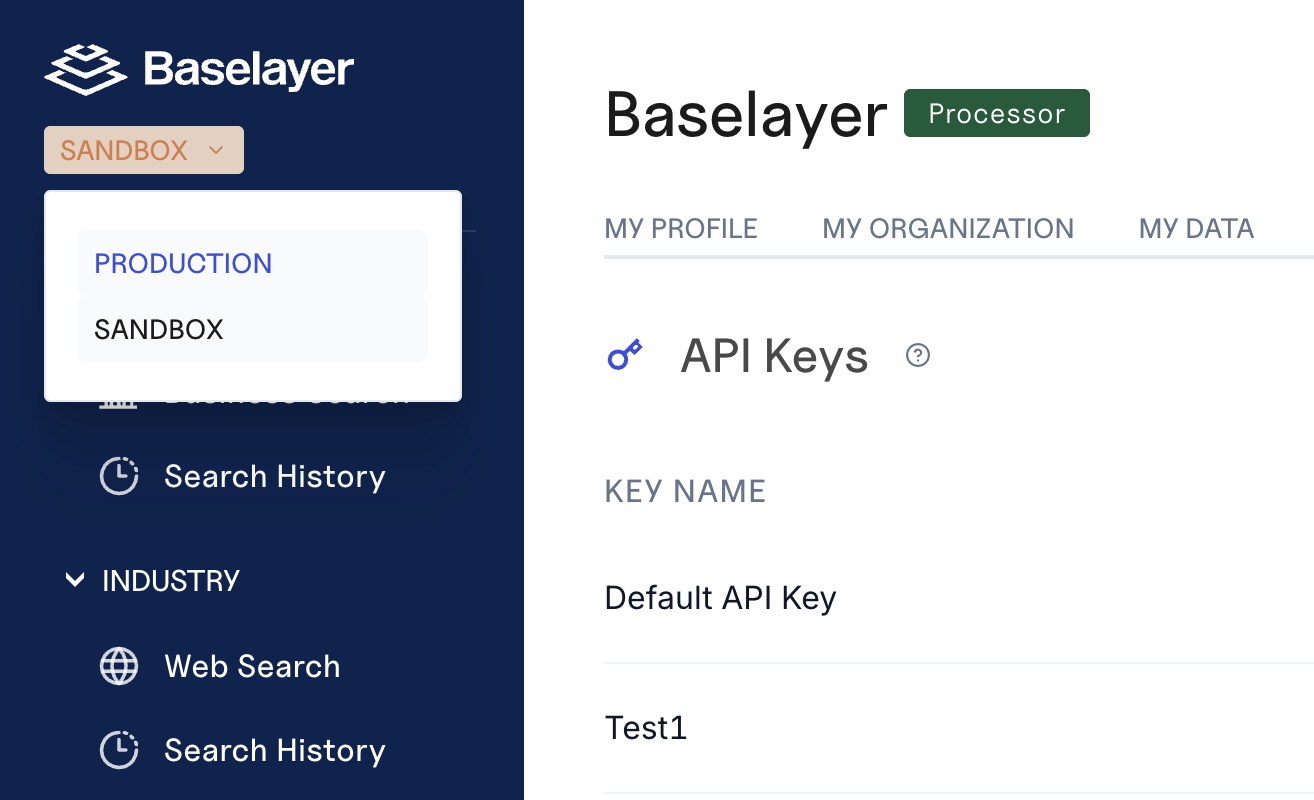
The environment selector in the top-left corner determines which environment you're viewing
⚠️ Critical: This dropdown controls what you see throughout the entire console, including which API keys are displayed or the search history.
Finding Your API Keys
The API Keys section shows different keys depending on which environment you've selected:
- Log into the Baselayer console at https://console.baselayer.com
- First, select your desired environment using the dropdown in the top-left:
- Select SANDBOX for testing keys
- Select PRODUCTION for live keys
- Navigate to the API Keys section in the sidebar
- Copy the API key(s) shown
Important: Always check the environment dropdown before copying an API key. If you copy a key without noting which environment you're in, you won't be able to tell which type of key you have just by looking at it.
Understanding Sandbox
Sandbox is designed for integration testing and development without risk or cost.
Key Characteristics
✓ Completely free - No charges for any requests
✓ Safe to experiment - Make as many requests as you need
✓ Pre-defined test data - Consistent, predictable responses for testing edge cases
How Sandbox Data Works
Sandbox uses static, pre-defined test cases to help you integrate Baselayer. We provide a spreadsheet with sample businesses and scenarios you can use for testing.
Critical Limitation: Exact Input Matching
For sandbox requests to succeed, your inputs must exactly match the test cases we provide:
- ✅ Case-insensitive: "ACME Corp" and "acme corp" both work
- ❌ Spaces matter: "123 Main St" ≠ "123 Main St" (extra space)
- ❌ Punctuation matters: "Main St." ≠ "Main St"
- ❌ Extra fields can break requests: Adding "US" to the end of addresses when it's not in the test data will cause the request to fail
Common example: If your system automatically appends "US" to all addresses, but our test data shows "123 Main Street, New York, NY 10001" (without "US"), the sandbox request will fail. You'll need to remove the "US".
What's Available in Sandbox
Most Baselayer endpoints are available in sandbox. If you need a specific endpoint or test case for your integration that isn't currently available, contact your Baselayer account manager and we can set it up for you.
Note on response times: Some endpoints (like Industry Prediction) may respond faster in sandbox than production since they return pre-defined data rather than running live analysis.
Understanding Production
Production is the live environment where you verify real businesses with real data.
Key Characteristics
Real-time data - Live business verification against authoritative sources
Live billing - Every request is counted and billed according to your plan
Variable response times - Actual analysis may take longer than sandbox's static responses
Complete feature access - All Baselayer endpoints and capabilities
How Production Differs
- Any valid input works - You're not limited to pre-defined test cases
- You incur charges - Every request is billed, so be intentional about your usage
- Response times vary - Depending on the complexity of the request and data sources
- Real business data - You're receiving actual, current information about businesses
Moving from Sandbox to Production
When you're ready to go live, follow this checklist:
Before You Switch
- Confirm your integration works correctly with all sandbox test cases
- Review edge case handling (failed searches, incomplete data, IRS outage handling, etc.)
- Understand your production pricing and rate limits
- Set up monitoring for API usage and errors
Making the Switch
- Copy your Production API Key from the Baselayer console
- Update your code to use the production key (typically in your environment variables or configuration)
- Verify your environment - Check that the console shows "Production" in the top-left banner
- Start with a small test - Make 1-2 production requests to confirm everything works
- Notify Baselayer - Let your account manager know you've gone live so we can monitor your integration
⚠️ Never commit API keys to version control. Use environment variables or secure secret management.
Common Mistakes to Avoid
❌ Mistake #1: Using Production Keys During Development
Problem: Developers testing locally with production keys rack up charges
Solution: Always use sandbox keys for development and testing. Only use production keys in your live application.
❌ Mistake #2: Not Matching Sandbox Test Cases Exactly
Problem: Adding extra information (like "US") or slight variations causes sandbox requests to fail
Solution: Use the test data spreadsheet exactly as provided. If your system formats data differently, consider normalizing it before sending to Baselayer.
❌ Mistake #3: Not Testing Edge Cases in Sandbox
Problem: Moving to production without testing failures, incomplete data, etc.
Solution: Use the full range of test cases in sandbox to understand how Baselayer handles different scenarios.
Need Help?
If you're unsure which environment you should be using, or if you need additional sandbox test cases for your integration, reach out to your Baselayer representative.
Quick Reference:
- Testing/integrating → Use Sandbox API Key
- Live business verification → Use Production API Key
- When in doubt → Check the banner in the top-left of the console
Last updated: 12.18.2025
Updated 9 months ago