
Webhooks at Baselayer
Real-time notifications for asynchronous API operations.
Baselayer's API is designed to be asynchronous by default. Most verification and enrichment operations happen in the background, with results delivered via webhooks when processing completes.
Why Webhooks?
Certain Baselayer products can take a few seconds to complete. During this time, the API is:
- Querying authoritative data sources
- Scraping and analyzing websites
- Running AI-powered enrichment
- Performing multi-step verification workflows
Webhooks provide real-time notifications the moment your data is ready, eliminating the need to constantly poll our API.
Webhooks vs. API Polling
| Approach | How It Works | Pros | Cons |
|---|---|---|---|
| Webhooks (Recommended) | Baselayer sends HTTP POST to your endpoint when results are ready | Real-time notifications, efficient, no wasted requests | Requires endpoint setup and signature verification |
| API Polling | Your system repeatedly checks GET /searches/{id} for completion | Simple to implement initially, no webhook infrastructure needed | Inefficient, can miss timing windows, requires retry logic |
Recommendation: Use webhooks for production integrations. Baselayer's async architecture is optimized for webhook delivery.
Setting Up Webhook Endpoints
Via Console (Recommended)
- Log into the Baselayer console
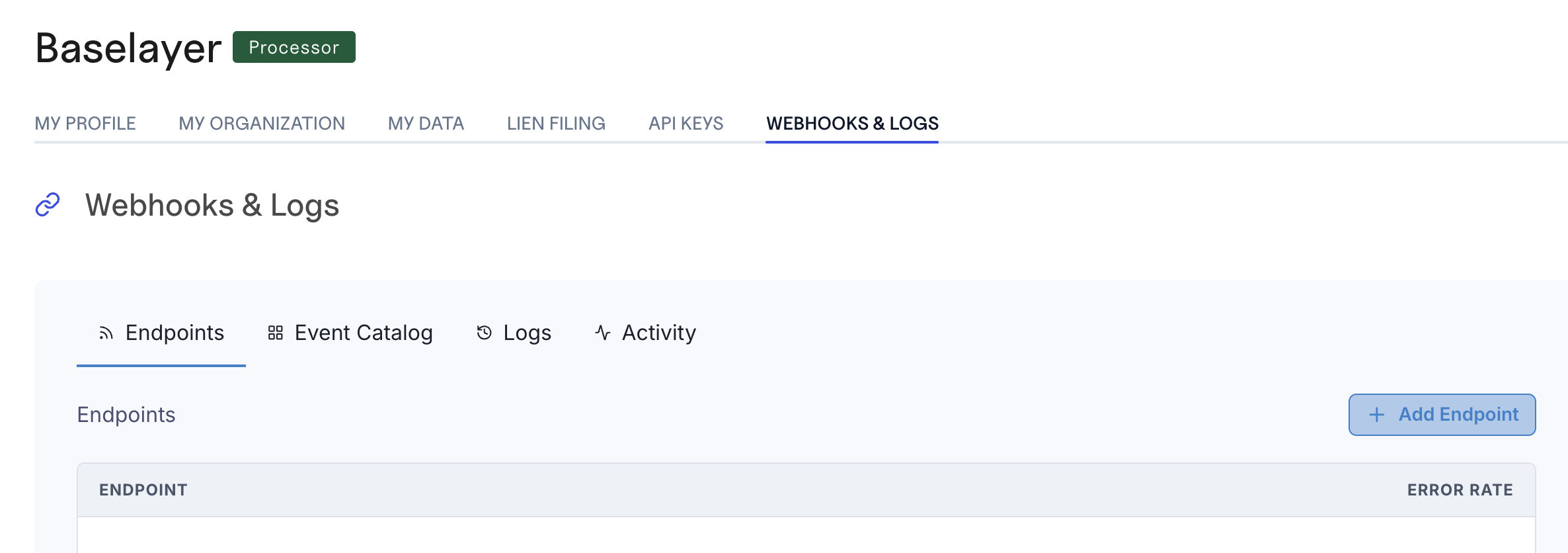
- Navigate to the Webhooks & Logs tab in the sidebar
- Click Add Endpoint
- Enter your endpoint parameters URL (must be HTTPS)
- Subscribe to the required events
- We recommend creating one single endpoint per event type
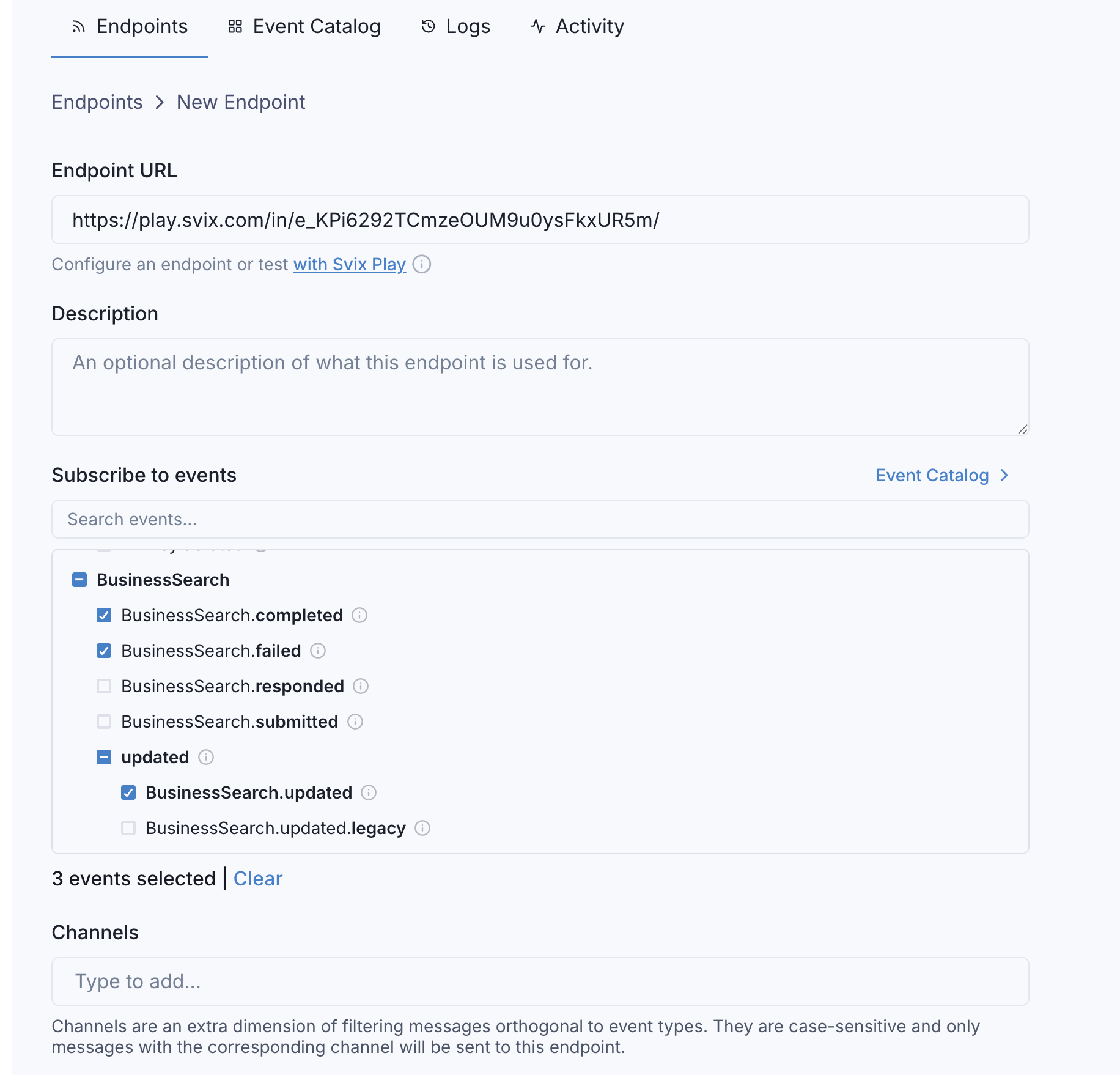
- Save the endpoint
- Copy your signing secret - you'll need this to verify webhook signatures
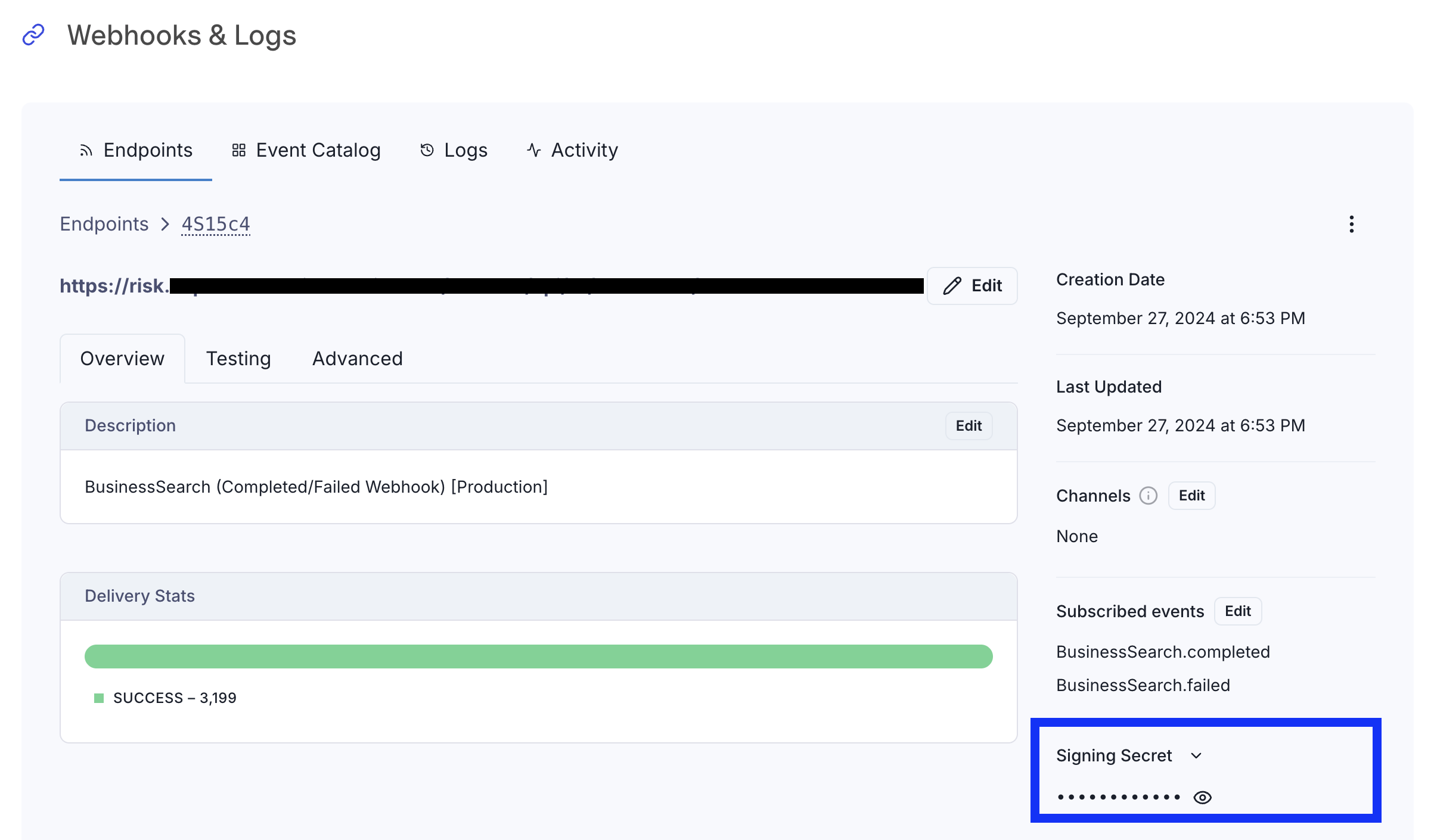
The signing secret will look like: whsec_C2FVsBQIhrscChlQIMV+b5sSYspob7oD
⚠️ Important: Your endpoint must use HTTPS. HTTP endpoints will be rejected.
Via API (Programmatic Setup)
You can also create webhook endpoints programmatically:
cURL Example
curl https://api.baselayer.com/webhooks \
  -X POST \
  -H "X-API-Key: your_api_key_here" \
  -H "Content-Type: application/json" \
  -d '{
    "url": "https://your-domain.com/webhooks/baselayer",
    "description": "Production webhook endpoint"
  }'
Python Example
import requests

url = "https://api.baselayer.com/webhooks"

headers = {
    "X-API-Key": "your_api_key_here",
    "Content-Type": "application/json"
}

payload = {
    "url": "https://your-domain.com/webhooks/baselayer",
    "description": "Production webhook endpoint"
}

response = requests.post(url, json=payload, headers=headers)
endpoint = response.json()

# Save this secret - you'll need it to verify webhook signatures
signing_secret = endpoint["secret"]
The API will automatically generate a signing secret. Store it securely - you'll need it to verify incoming webhooks.
For signature verification details, see the Authentication guide.
Understanding Webhook Events
Every webhook Baselayer sends includes standardized metadata and event-specific data.
Event Structure
All webhook events include an __event__ field with metadata:
{
  "__event__": {
    "type": "BusinessSearch.completed",
    "origin": "api"
  },
  "id": "e7e7e7c9-f0ad-4434-9766-a1d127ed12c3",
  "state": "COMPLETED",
  // ... additional event-specific fields
}
Common Event Patterns
Baselayer webhooks follow consistent naming patterns:
.submitted- Request received and queued for processing.started- Processing has begun.completed- Processing finished successfully, data is ready.failed- Processing failed (insufficient data, invalid input, etc.).cancelled- Request was cancelled before completing.responded- A response was produced (webhook-only event; there is no matching resource state).updated- Initial results have been updated with additional data
Not all products emit all event types. Check product-specific documentation for complete event listings.
Event Names vs. Resource state
stateWebhook event names are lowercase and describe something that happened. The state field on the resource itself is uppercase and describes where the request is in its lifecycle: PENDING, EXECUTING, COMPLETED, FAILED, or CANCELLED. They map as follows:
Resource state | Corresponding webhook event |
|---|---|
PENDING | .submitted |
EXECUTING | .started |
COMPLETED | .completed |
FAILED | .failed |
CANCELLED | .cancelled |
.responded and .updated are webhook-only events with no corresponding resource state.
Webhook Lifecycle Examples
Example 1: Standard Async Flow
Most Baselayer API calls follow this pattern:
1. You make API request: POST /searches
   → API responds: 2xx Accepted with search_id

2. Webhook received: BusinessSearch.submitted
   → Confirms request is queued

3. [Baselayer processing: 3-5 seconds]
   - Querying authoritative sources
   - Running enrichment
   - Analyzing data

4. Webhook received: BusinessSearch.completed
   → Full verification data included
   → Process results in your system
Sample BusinessSearch.completed Webhook
BusinessSearch.completed Webhook{
"__event__": {
"type": "BusinessSearch.completed",
"origin": "api"
},
"id": "a1b2c3d4-5678-90ab-cdef-1234567890ab",
"state": "COMPLETED",
"business": {
"name": "Baselayer Technologies Inc",
"registration": { ... },
"officers": [ ... ],
"scores": [
{
"type": "risk",
"value": "A",
"score": 0.95
}
]
},
"created_at": "2025-12-29T10:15:30Z"
}Example 2: Updated Events - TIN Retry
Some data may be unavailable initially but delivered later via .updated webhooks.
Scenario: IRS TIN Matching Temporarily Unavailable
1. POST /searches with TIN provided

2. Webhook: BusinessSearch.completed
   {
     "tin_matched": null,
     "warnings": ["IRS Validation is unavailable."]
   }
   → Search completed, but TIN match pending

3. [Baselayer automatically retries TIN verification]
   → Retry intervals: 10 min, 20 min, then hourly

4. Webhook: BusinessSearch.updated (when IRS available)
   {
     "tin_matched": true,
     "warnings": []
   }
   → TIN verification now complete
For detailed information about IRS TIN verification and outage handling, see the IRS Outage Handling guide.
Example 3: Updated Events - Liens/Docket Search
Requesting liens or dockets triggers an additional verification pass:
1. POST /searches

2. Webhook: BusinessSearch.completed
   → Initial business verification data

3. POST /lien_searches

4. [Baselayer retrieves lien records]
   → Can take 5-10 seconds

5. Webhook: LiensSearch.completed
   → Includes liens data

6. Webhook: BusinessSearch.updated
   → scores array may be updated (risk score recalculated based on lien findings)
Key Insight: Always handle .updated webhooks to ensure you have the most current data.
Webhook Delivery & Retries
Baselayer uses Svix for reliable webhook delivery.
Retry Behavior
If your endpoint fails to respond with a 2xx status code, Baselayer will automatically retry:
- Initial attempt: Immediate delivery
- Retry schedule: Exponential backoff over 5 attempts
- 5 seconds, 5 minutes, 30 minutes, 2 hours, final retry after 5 hours
Total retry window: ~8 hours
If all retries fail, the webhook is marked as failed. You can replay failed webhooks from the Baselayer console.
Handling Retries in Your Code
Webhooks may be delivered more than once (retries, network issues, etc.). Implement idempotency using the event ID:
def handle_webhook(event):
    event_id = event["id"]

    # Check if we've already processed this event
    if already_processed(event_id):
        return 200  # Acknowledge but don't reprocess

    # Process the event
    process_business_search(event)

    # Mark as processed
    mark_processed(event_id)

    return 200
Best Practices
1. Return 200 Quickly
Your webhook endpoint should acknowledge receipt immediately (within 5 seconds).
Don't perform long-running operations before returning 200, or Baselayer may time out and retry.
2. Always Verify Signatures
Never trust webhook data without verification. See the Authentication guide for implementation details.
3. Handle .updated Events
.updated EventsSome workflows (TIN verification, liens or docket searches) may send updated data after initial completion.
4. Implement Idempotency
Use the event id field to prevent duplicate processing.
In production, store processed IDs in your database or cache.
5. Monitor Webhook Health
Regularly check the Baselayer console's webhook dashboard for failed deliveries or high error rates.
Failed webhooks can be manually replayed from the console.
When to Use API Polling Instead
Webhooks are recommended for most use cases, but polling may be appropriate for:
1. Synchronous Business Search
Business Search supports synchronous mode using the Accept header for immediate results:
cURL Example
curl --request POST \
  --url https://api.baselayer.com/searches \
  --header 'X-API-Key: your_api_key_here' \
  --header 'Accept: application/vnd.osiris.sync+json' \
  --header 'Content-Type: application/json' \
  --data '{
    "name": "Baselayer Technologies Inc",
    "address": "149 New Montgomery St, San Francisco, CA 94105"
  }'
Python Example
response = requests.post(
    "https://api.baselayer.com/searches",
    headers={
        "X-API-Key": api_key,
        "Accept": "application/vnd.osiris.sync+json",  # Synchronous mode
        "Content-Type": "application/json"
    },
    json={
        "name": "Baselayer Technologies Inc",
        "address": "149 New Montgomery St, San Francisco, CA 94105"
    }
)

# Results included in response (no webhook needed)
business = response.json()Note: Only Business Search supports synchronous mode. All other products are async-only.
2. Testing & Development
For quick testing without webhook infrastructure:
# Create search
response = requests.post(url, json=payload)
search_id = response.json()["id"]

# Poll for completion
import time

while True:
    result = requests.get(f"{url}/{search_id}")
    state = result.json()["state"]

    if state == "COMPLETED":
        print("Results ready!")
        break
    elif state == "FAILED":
        print("Search failed")
        break

    time.sleep(5)  # Wait 5 seconds between checks
3. Simple One-Off Integrations
If you're only running occasional searches and don't want to set up webhook infrastructure, polling is acceptable.
Important: For production use at scale, webhooks are significantly more efficient.
Next Steps
Now that you understand webhooks, you're ready to:
- Authenticate your webhook endpoint (signature verification)
- Understand async vs. sync API patterns
- Start building with product-specific guides:
- Business Search
- Portfolio Monitoring
- Other products
For detailed webhook event schemas and specifications, see the API reference.
For questions about webhooks or integration support, contact your Baselayer account manager.
Updated 7 days ago