
Authentication
How to authenticate API requests and verify webhooks.
Baselayer uses API key authentication for API requests and HMAC-SHA256 signatures for webhook verification. This guide covers both authentication methods.
API Authentication
All Baselayer API requests require authentication using an API key passed in the X-API-Key header.
Getting Your API Key
- Log into the Baselayer console
- Select your environment using the dropdown in the top-left corner (SANDBOX or PRODUCTION)
- Navigate to the API Keys section in the sidebar
- Copy your API key
⚠️ Important: Make sure you've selected the correct environment before copying your key. Sandbox keys only work with sandbox data, and production keys will incur charges. See Sandbox vs. Production Environments for details.
Base URL
All API requests use the same base URL:
https://api.baselayer.comMaking Authenticated Requests
Include your API key in the X-API-Key header with every request.
cURL Example
curl https://api.baselayer.com/searches \
  -X POST \
  -H "X-API-Key: your_api_key_here" \
  -H "Content-Type: application/json" \
  -d '{
    "name": "Baselayer Technologies Inc",
    "address": "149 New Montgomery St, San Francisco, CA 94105"
  }'
Python Example
Using the requests library:
import requests

url = "https://api.baselayer.com/searches"

headers = {
    "X-API-Key": "your_api_key_here",
    "Content-Type": "application/json"
}

payload = {
    "name": "Baselayer Technologies Inc",
    "address": "149 New Montgomery St, San Francisco, CA 94105"
}

response = requests.post(url, json=payload, headers=headers)
data = response.json()
Webhook Authentication
Baselayer uses Svix to deliver webhooks with HMAC-SHA256 signatures for secure verification.
How Webhook Signing Works
Every webhook request includes cryptographic signatures in the headers that you can verify to ensure:
- The webhook came from Baselayer (not a malicious third party)
- The payload hasn't been tampered with
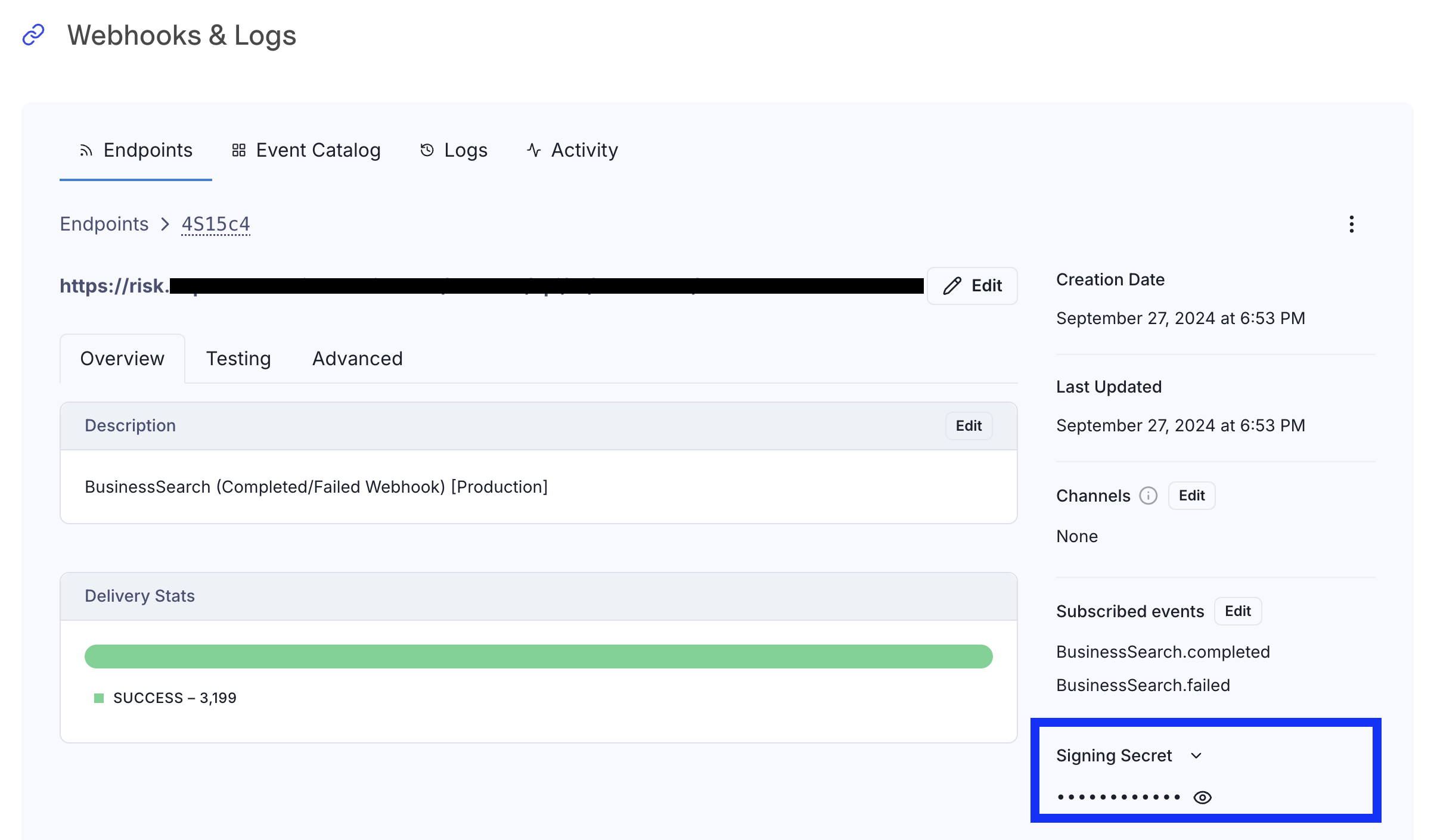
Getting Your Signing Secret
- Log into the Baselayer console
- Navigate to the Webhooks & Logs section
- Find your webhook endpoint
- The signing secret is displayed next to your endpoint URL
The secret will look like: whsec_C2FVsBQIhrscChlQIMV+b5sSYspob7oD
Verifying Webhook Signatures
Baselayer uses Svix for webhook delivery. For detailed verification instructions and code examples, see the Svix webhook verification guide.
Security Best Practices
Protecting Your API Keys
✓ Use environment variables: Never hardcode API keys in your code
import os
api_key = os.environ.get("BASELAYER_API_KEY")
✓ Use secret managers: For production, use AWS Secrets Manager, Google Secret Manager, or similar
✓ Never commit keys to version control: Add .env files to your .gitignore
# .gitignore
.env
*.env
✗ Don't expose keys in client-side code: API keys should only be used in backend services
Environment Separation
- Development/Testing: Use sandbox API keys
- Production: Use production API keys only in your live application
Accidentally using production keys during testing will result in unexpected charges.
Key Rotation
If you believe an API key has been compromised:
- Generate a new API key in the Baselayer console
- Update your application to use the new key
- Delete the compromised key
- Monitor your usage for any suspicious activity
Webhook Security
- Always verify signatures: Check the HMAC signature on every webhook
- Use HTTPS endpoints: Webhook endpoints must use HTTPS
- Implement idempotency: Webhooks may be delivered more than once; use the event ID to deduplicate
Troubleshooting
401 Unauthorized
Cause: Missing or invalid API key
Solutions:
- Verify the
X-API-Keyheader is included in your request - Check that you copied the complete API key (no extra spaces or characters)
- Confirm you're using a valid, non-deleted API key
- Ensure you're using the correct environment key (sandbox vs. production)
403 Forbidden
Cause: Your API key doesn't have access to the requested resource
Solutions:
- Verify you're using a production key for production resources
- Check that your account has access to the endpoint you're calling
Next Steps
Now that you understand authentication, you're ready to:
- Get started with the Baselayer API
- Understand Sandbox vs. Production environments
- Set up webhooks (link to be updated when webhooks guide is created)
For questions about authentication or API access, contact your Baselayer account manager.
Updated 28 days ago