> ## Documentation Index
> Fetch the complete documentation index at: https://docs.baselayer.com/llms.txt
> Use this file to discover all available pages before exploring further.
# Business Search: Batch Searches
## Batch Search: How to Run Bulk Searches in Baselayer
Batch Search allows you to process hundreds or thousands of Business Searches at once via CSV upload. It's the fastest way to onboard large customer lists, refresh existing portfolios, or prepare businesses for Portfolio Monitoring at scale.
This guide covers how to run batch searches through both the Console and API. For understanding individual Business Search results, see [Business Search: Basics](/docs/business-search-basics). For adding businesses to monitoring after verification, see [Portfolio Monitoring](/docs/portfolio-monitoring).
***
## Prerequisites
Before running a batch search, ensure you have:
* **CSV file formatted to Baselayer's schema** - Download the example CSV template from the [Baselayer Console](https://console.baselayer.com) under Batch Search or [here](https://storage.googleapis.com/osiris-public-assets-prod/schemas/baselayer_batch_search_csv_schema.csv)
* **API key** (for API-based batches) - See [Authentication](/docs/authentication)
* **Portfolio created** (optional, if adding to portfolio) - See [Portfolio Monitoring: Basics](/docs/portfolio-monitoring)
***
## 1. What Batch Search Does
When you run a Batch Search, Baselayer:
* Processes each business in your CSV file as an individual search
* Applies any selected add-ons (Enhanced Search, Industry, Website Analysis, PEP)
* Optionally **adds all results to Portfolio Monitoring**
* Returns results asynchronously as searches complete
* Stores the full batch record for later review
Batch Search is ideal for:
* Migrating an existing book of business
* Periodic refreshes of a vendor or customer list
* Running KYB on large lead pipelines
* Preparing large sets of customers for Portfolio Monitoring
***
## 2. Running a Batch Search in the Console
Navigate to:\
**Console → Batch Search → Upload CSV**
 You will be asked to:
* Upload a CSV file (up to 100MB)
* Provide a batch name
* (Optional) **Add all businesses to your Portfolio**
* (Optional) **Monitor all businesses**
* (Optional) Add results to a specific Portfolio Group
* (Optional) Enable Enhanced Search, Industry, Website Analysis, or PEP checks
Your selections apply to **every row in the CSV**.
**Important:** Batch searches are asynchronous.\
Baselayer provisions additional backend resources to handle large jobs.\
This means:
* Most batches begin running within **\~3 minutes**
* Larger batches may take **up to 10 minutes** to start
***
## 3. Running a Batch Search via API
Use the POST `/searches/batches` endpoint with a multipart form-data request:
```bash theme={null}
curl --request POST \
--url https://api.baselayer.com/searches/batches \
--header 'X-API-Key: ' \
--header 'Content-Type: multipart/form-data' \
--form 'file=@/path/to/your/batch.csv' \
--form 'batch={
"name": "December Onboarding Batch",
"portfolio": {
"add_to_portfolio": true,
"monitor": true,
"group_id": "optional-group-uuid"
}
}' \
--form 'options=["Order.NaicsPrediction", "Order.WebsiteAnalysis"]'
```
**Request parameters:**
* `file` - Your CSV file (required, max 100MB)
* `batch.name` - Descriptive name for this batch (required)
* `batch.portfolio.add_to_portfolio` - Add all businesses to portfolio (optional, default: false)
* `batch.portfolio.monitor` - Enable monitoring for all businesses (optional, default: false)
* `batch.portfolio.group_id` - Portfolio group to add businesses to (optional)
* `options` - Array of order options to apply to all searches (optional)
**Available options:**
* `Order.Enhanced` - Most comprehensive search with web scraping
* `Order.NaicsPrediction` - Industry classification
* `Order.WebsiteAnalysis` - Website discovery and analysis
* `Order.Pep` - Politically exposed persons screening
**Response:**
```json theme={null}
{
"id": "batch-uuid-here",
"name": "December Onboarding Batch",
"state": "PENDING",
"created_at": "2025-12-30T10:00:00Z",
"total_items": 1500
}
```
Store the batch `id` to query progress and retrieve results.
### Retrieving Batch Status
Query batch progress:
```bash theme={null}
GET /searches/batches/{batch_id}
```
Retrieve individual search results:
```bash theme={null}
GET /searches/batches/{batch_id}/items
```
Each item represents one Business Search from the batch with the full search response.
***
## 4. CSV Format Requirements
Your CSV must follow the official Baselayer schema exactly.\
The example CSV provided in the Console shows all allowed columns and formatting rules.
**Required columns:**
* `name` - Business legal name
* `address` - Full business address (or separate street, city, state, zip columns)
**Optional columns:**
* `tin` - Business EIN/TIN (enables IRS verification)
* `website` - Business website URL
* `officer_names` - Comma-separated list of officers
* `phone_number` - Business phone number
* `email` - Business email
* `reference_id` - Your internal ID for this business
**Critical formatting rules:**
* Do not change column headers
* Do not add or remove columns
* Do not reorder columns
* Follow exact address formatting from the template
* Use UTF-8 encoding
* Maximum file size: 100MB
If a row's input is malformed, that item will be marked as failed in the batch results. You can review failed items and resubmit them with corrected data.
***
## 5. Understanding Batch Execution Timing
Batch processing is a timed, asynchronous workflow.
Baselayer automatically provisions compute resources for the batch. As a result:
* Most batches start processing within 3 minutes
* Very large uploads may take up to 10 minutes before processing begins
* Execution time varies by number of rows and selected add-ons
You may safely close the Console or disconnect from the API - the batch will continue running.
***
## 6. Reviewing Batch Results
### Console Review
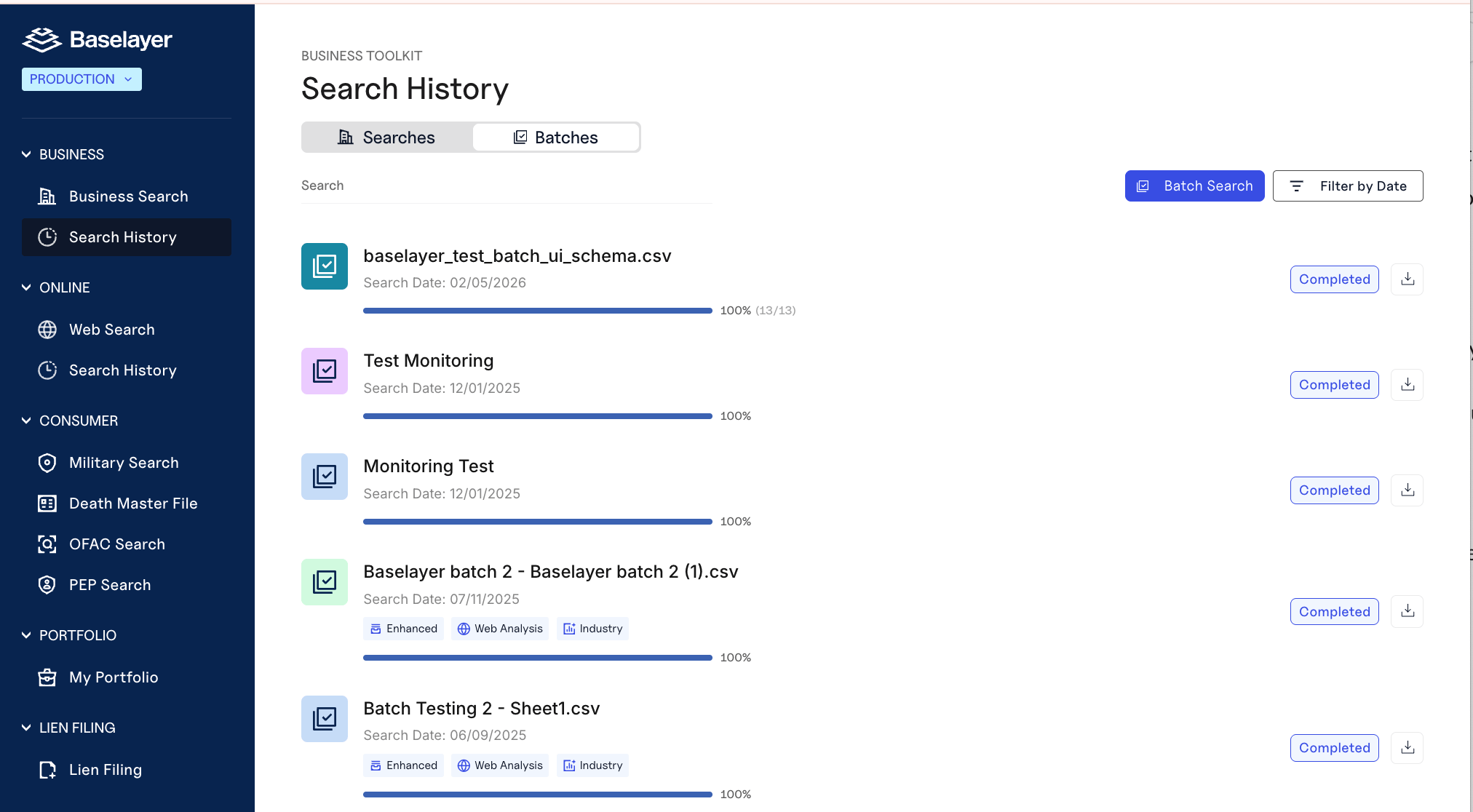
Navigate to **Search History → Batches** in the Console to view:
* Search status (completed, failed, pending)
* Any add-ons applied (Industry, Website Analysis, PEP)
* Basic results (number of searches and number of failed searches)
You'll also find a download icon for completed batches. Clicking download generates a ZIP archive containing structured export files.
The ZIP always includes:
* `business_search.csv` – Core Business Search results
* `business_search.jsonl` – Same data in JSON Lines format
* `README.txt` – Documentation explaining each file and column structure
If add-ons were selected, additional files are included:
* `website_analysis.csv` / `.jsonl` – If Website Analysis was ordered
* `industry_prediction.csv` / `.jsonl` – If Industry Prediction was ordered
* `reviews_and_socials.csv` – If Reviews & Socials was ordered
Each file uses `search_id` as a shared key so you can join data across products.
> **Note:** Selecting Enhanced Search automatically includes Website Analysis and Industry Prediction. Only files for products that were requested will appear in the export.
### Export to CSV
Download all batch results as a single CSV file for spreadsheet analysis:
```bash theme={null}
GET /searches/batch/{batch_id}/export
```
**What you get:**
* JSONL format (one complete Business Search JSON object per line)
* Served as CSV file (`text/csv` mime-type) for easy import into Excel, Google Sheets, or data analysis tools
* Each row represents one business search with all fields
* Complex objects (addresses, registrations, officers) are JSON-encoded in single columns
***
## 7. Best Practices
### Before Running Your Batch
✅ **Test with a small sample first** - Upload 5-10 rows to verify formatting before submitting your full file
✅ **Clean your data** - Remove duplicates, standardize address formats, validate TINs before upload
✅ **Use the exact template** - Download fresh from Console for each batch to ensure you have the latest schema
### During Batch Execution
✅ **Don't modify the batch** - Once submitted, you cannot edit or cancel. Let it complete.
✅ **Use Groups for segmentation** - Upload different customer segments to different Portfolio Groups for cleaner monitoring
✅ **Consider costs** - Each row in your batch is billed as an individual Business Search, plus any add-ons selected
### After Batch Completion
✅ **Review failed items** - Identify patterns in failures (common: address or TIN formatting issues)
✅ **Store `business_id`** - Map batch results to your internal systems for future reference
✅ **Use batch monitoring to initialize portfolio** - Enable monitoring during batch upload rather than adding businesses individually later
### Automation
✅ **Use the API for recurring batches** - Automate periodic portfolio refreshes or customer onboarding
✅ **Integrate with your CRM** - Export customer lists directly to Baselayer's batch format
***
## 8. Next Steps
**Understand batch results:**
* [Business Search: Basics](/docs/business-search-basics) - Interpret search results for each business
* [Scores & Ratings](/docs/baselayer-scores-ratings) - Use KYB and Risk ratings for batch decisioning
* [Business Search: Best Practices](/docs/business-search-1) - Build verification logic for batch results
**Enable monitoring for batches:**
* [Portfolio Monitoring: Basics](/docs/portfolio-monitoring) - Understand continuous monitoring
* [Portfolio Monitoring: Best Practices](/docs/portfolio-monitoring-best-practices) - Configure monitoring for batch-uploaded businesses
**Process batch results:**
* [API Reference](/api-reference) - Retrieve and filter batch items programmatically
* [Exporting PDF Reports](/docs/exporting-pdf-reports-in-baselayer) - Generate reports for batch results
***
## 9. Summary
Batch Search enables large-scale Business Search execution through a single CSV upload. Use it to process thousands of businesses efficiently, add them to Portfolio Monitoring, and maintain consistent verification across your customer base.
**Key capabilities:**
* Console or API submission
* Automatic portfolio addition
* Monitoring enablement at scale
* Add-on enrichments (Enhanced, Industry, Website, PEP)
* Asynchronous processing with status tracking
For questions about batch limits, pricing, or optimization, contact your Baselayer account manager.
This documentation is built and hosted on [Mintlify](https://mintlify.com), a developer documentation platform.
You will be asked to:
* Upload a CSV file (up to 100MB)
* Provide a batch name
* (Optional) **Add all businesses to your Portfolio**
* (Optional) **Monitor all businesses**
* (Optional) Add results to a specific Portfolio Group
* (Optional) Enable Enhanced Search, Industry, Website Analysis, or PEP checks
Your selections apply to **every row in the CSV**.
**Important:** Batch searches are asynchronous.\
Baselayer provisions additional backend resources to handle large jobs.\
This means:
* Most batches begin running within **\~3 minutes**
* Larger batches may take **up to 10 minutes** to start
***
## 3. Running a Batch Search via API
Use the POST `/searches/batches` endpoint with a multipart form-data request:
```bash theme={null}
curl --request POST \
--url https://api.baselayer.com/searches/batches \
--header 'X-API-Key: ' \
--header 'Content-Type: multipart/form-data' \
--form 'file=@/path/to/your/batch.csv' \
--form 'batch={
"name": "December Onboarding Batch",
"portfolio": {
"add_to_portfolio": true,
"monitor": true,
"group_id": "optional-group-uuid"
}
}' \
--form 'options=["Order.NaicsPrediction", "Order.WebsiteAnalysis"]'
```
**Request parameters:**
* `file` - Your CSV file (required, max 100MB)
* `batch.name` - Descriptive name for this batch (required)
* `batch.portfolio.add_to_portfolio` - Add all businesses to portfolio (optional, default: false)
* `batch.portfolio.monitor` - Enable monitoring for all businesses (optional, default: false)
* `batch.portfolio.group_id` - Portfolio group to add businesses to (optional)
* `options` - Array of order options to apply to all searches (optional)
**Available options:**
* `Order.Enhanced` - Most comprehensive search with web scraping
* `Order.NaicsPrediction` - Industry classification
* `Order.WebsiteAnalysis` - Website discovery and analysis
* `Order.Pep` - Politically exposed persons screening
**Response:**
```json theme={null}
{
"id": "batch-uuid-here",
"name": "December Onboarding Batch",
"state": "PENDING",
"created_at": "2025-12-30T10:00:00Z",
"total_items": 1500
}
```
Store the batch `id` to query progress and retrieve results.
### Retrieving Batch Status
Query batch progress:
```bash theme={null}
GET /searches/batches/{batch_id}
```
Retrieve individual search results:
```bash theme={null}
GET /searches/batches/{batch_id}/items
```
Each item represents one Business Search from the batch with the full search response.
***
## 4. CSV Format Requirements
Your CSV must follow the official Baselayer schema exactly.\
The example CSV provided in the Console shows all allowed columns and formatting rules.
**Required columns:**
* `name` - Business legal name
* `address` - Full business address (or separate street, city, state, zip columns)
**Optional columns:**
* `tin` - Business EIN/TIN (enables IRS verification)
* `website` - Business website URL
* `officer_names` - Comma-separated list of officers
* `phone_number` - Business phone number
* `email` - Business email
* `reference_id` - Your internal ID for this business
**Critical formatting rules:**
* Do not change column headers
* Do not add or remove columns
* Do not reorder columns
* Follow exact address formatting from the template
* Use UTF-8 encoding
* Maximum file size: 100MB
If a row's input is malformed, that item will be marked as failed in the batch results. You can review failed items and resubmit them with corrected data.
***
## 5. Understanding Batch Execution Timing
Batch processing is a timed, asynchronous workflow.
Baselayer automatically provisions compute resources for the batch. As a result:
* Most batches start processing within 3 minutes
* Very large uploads may take up to 10 minutes before processing begins
* Execution time varies by number of rows and selected add-ons
You may safely close the Console or disconnect from the API - the batch will continue running.
***
## 6. Reviewing Batch Results
### Console Review
Navigate to **Search History → Batches** in the Console to view:
* Search status (completed, failed, pending)
* Any add-ons applied (Industry, Website Analysis, PEP)
* Basic results (number of searches and number of failed searches)
You'll also find a download icon for completed batches. Clicking download generates a ZIP archive containing structured export files.
The ZIP always includes:
* `business_search.csv` – Core Business Search results
* `business_search.jsonl` – Same data in JSON Lines format
* `README.txt` – Documentation explaining each file and column structure
If add-ons were selected, additional files are included:
* `website_analysis.csv` / `.jsonl` – If Website Analysis was ordered
* `industry_prediction.csv` / `.jsonl` – If Industry Prediction was ordered
* `reviews_and_socials.csv` – If Reviews & Socials was ordered
Each file uses `search_id` as a shared key so you can join data across products.
> **Note:** Selecting Enhanced Search automatically includes Website Analysis and Industry Prediction. Only files for products that were requested will appear in the export.
### Export to CSV
Download all batch results as a single CSV file for spreadsheet analysis:
```bash theme={null}
GET /searches/batch/{batch_id}/export
```
**What you get:**
* JSONL format (one complete Business Search JSON object per line)
* Served as CSV file (`text/csv` mime-type) for easy import into Excel, Google Sheets, or data analysis tools
* Each row represents one business search with all fields
* Complex objects (addresses, registrations, officers) are JSON-encoded in single columns
***
## 7. Best Practices
### Before Running Your Batch
✅ **Test with a small sample first** - Upload 5-10 rows to verify formatting before submitting your full file
✅ **Clean your data** - Remove duplicates, standardize address formats, validate TINs before upload
✅ **Use the exact template** - Download fresh from Console for each batch to ensure you have the latest schema
### During Batch Execution
✅ **Don't modify the batch** - Once submitted, you cannot edit or cancel. Let it complete.
✅ **Use Groups for segmentation** - Upload different customer segments to different Portfolio Groups for cleaner monitoring
✅ **Consider costs** - Each row in your batch is billed as an individual Business Search, plus any add-ons selected
### After Batch Completion
✅ **Review failed items** - Identify patterns in failures (common: address or TIN formatting issues)
✅ **Store `business_id`** - Map batch results to your internal systems for future reference
✅ **Use batch monitoring to initialize portfolio** - Enable monitoring during batch upload rather than adding businesses individually later
### Automation
✅ **Use the API for recurring batches** - Automate periodic portfolio refreshes or customer onboarding
✅ **Integrate with your CRM** - Export customer lists directly to Baselayer's batch format
***
## 8. Next Steps
**Understand batch results:**
* [Business Search: Basics](/docs/business-search-basics) - Interpret search results for each business
* [Scores & Ratings](/docs/baselayer-scores-ratings) - Use KYB and Risk ratings for batch decisioning
* [Business Search: Best Practices](/docs/business-search-1) - Build verification logic for batch results
**Enable monitoring for batches:**
* [Portfolio Monitoring: Basics](/docs/portfolio-monitoring) - Understand continuous monitoring
* [Portfolio Monitoring: Best Practices](/docs/portfolio-monitoring-best-practices) - Configure monitoring for batch-uploaded businesses
**Process batch results:**
* [API Reference](/api-reference) - Retrieve and filter batch items programmatically
* [Exporting PDF Reports](/docs/exporting-pdf-reports-in-baselayer) - Generate reports for batch results
***
## 9. Summary
Batch Search enables large-scale Business Search execution through a single CSV upload. Use it to process thousands of businesses efficiently, add them to Portfolio Monitoring, and maintain consistent verification across your customer base.
**Key capabilities:**
* Console or API submission
* Automatic portfolio addition
* Monitoring enablement at scale
* Add-on enrichments (Enhanced, Industry, Website, PEP)
* Asynchronous processing with status tracking
For questions about batch limits, pricing, or optimization, contact your Baselayer account manager.
This documentation is built and hosted on [Mintlify](https://mintlify.com), a developer documentation platform.