> ## Documentation Index
> Fetch the complete documentation index at: https://docs.baselayer.com/llms.txt
> Use this file to discover all available pages before exploring further.
# Account Settings
> Tailor how Baselayer screens and matches for your organization
Account Settings let your admins tailor how Baselayer works for your organization: which watchlists your searches screen against, how strict a name match must be before it is reported as a hit, and how broadly lien searches match debtor names.
Settings take effect on new searches as soon as they are saved. Searches that already ran keep the settings they ran with.
We're adding more options to Account Settings over time. This page will grow as new settings become available.
***
### Where to Find Them
Click your name at the bottom of the left sidebar and choose **Settings**. Only users with permission to update the organization (typically admins) can change settings; everyone else sees them read-only.
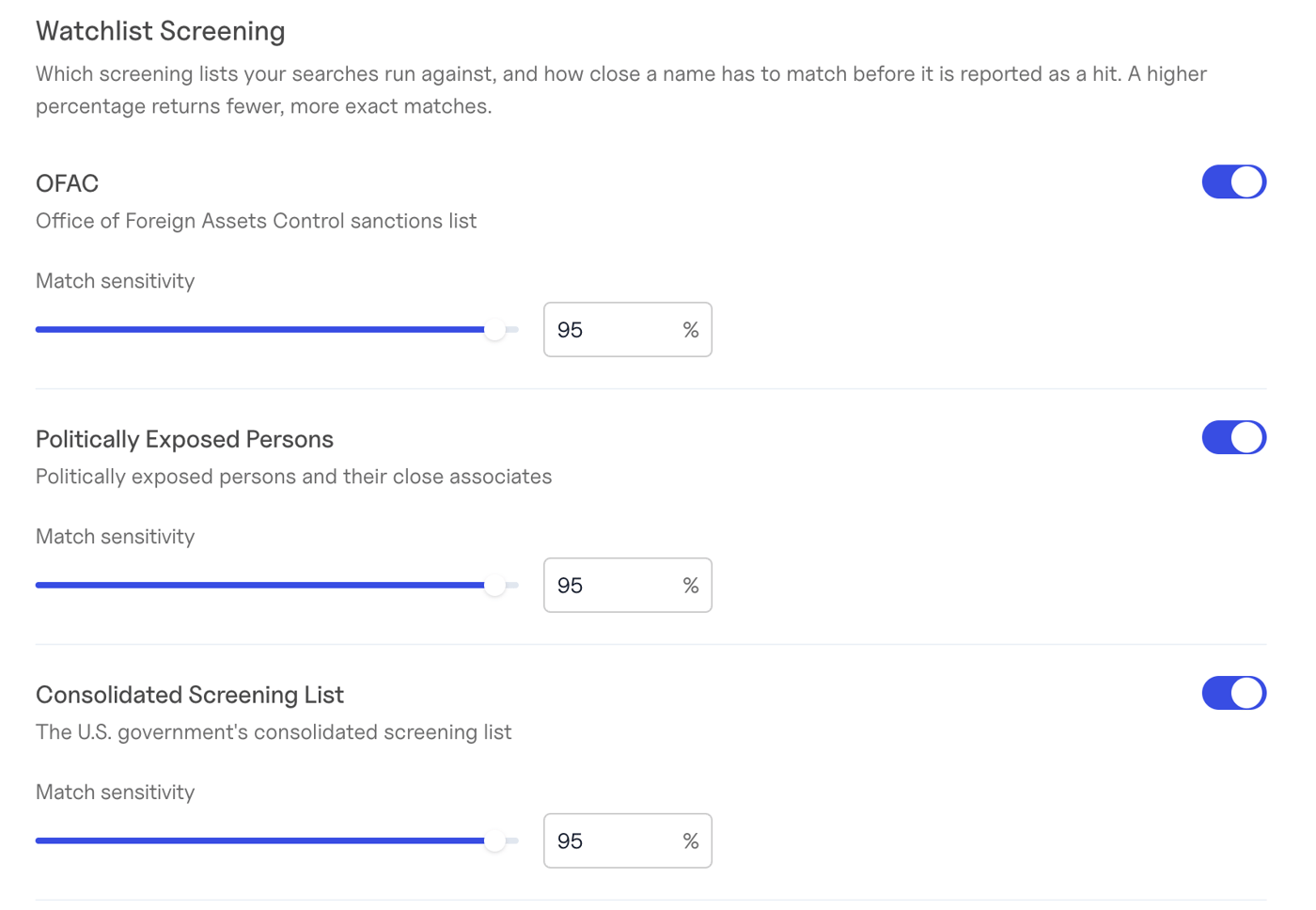 ***
### Watchlist Screening
Choose which screening lists your business searches and international business searches run against, and how close a name has to match before it is reported as a hit.
| List | Full name |
| :- | :- |
| OFAC | Department of Treasury, Office of Foreign Assets Control |
| PEP | Politically Exposed Persons |
| CSL | Department of Commerce, Consolidated Screening List |
| FBI | FBI Wanted List |
| CNS | Consolidated Canadian Autonomous Sanctions List |
| OIG | HHS OIG List of Excluded Individuals/Entities |
For each list you can:
* **Turn screening on or off.**
* **Set the match sensitivity** (similarity threshold) — the minimum name similarity, as a percentage, for a match to be reported. A higher percentage returns fewer, more exact matches; a lower one catches more spelling variations but returns more potential false positives to review.
By default every list is on, with a 95% similarity threshold.
***
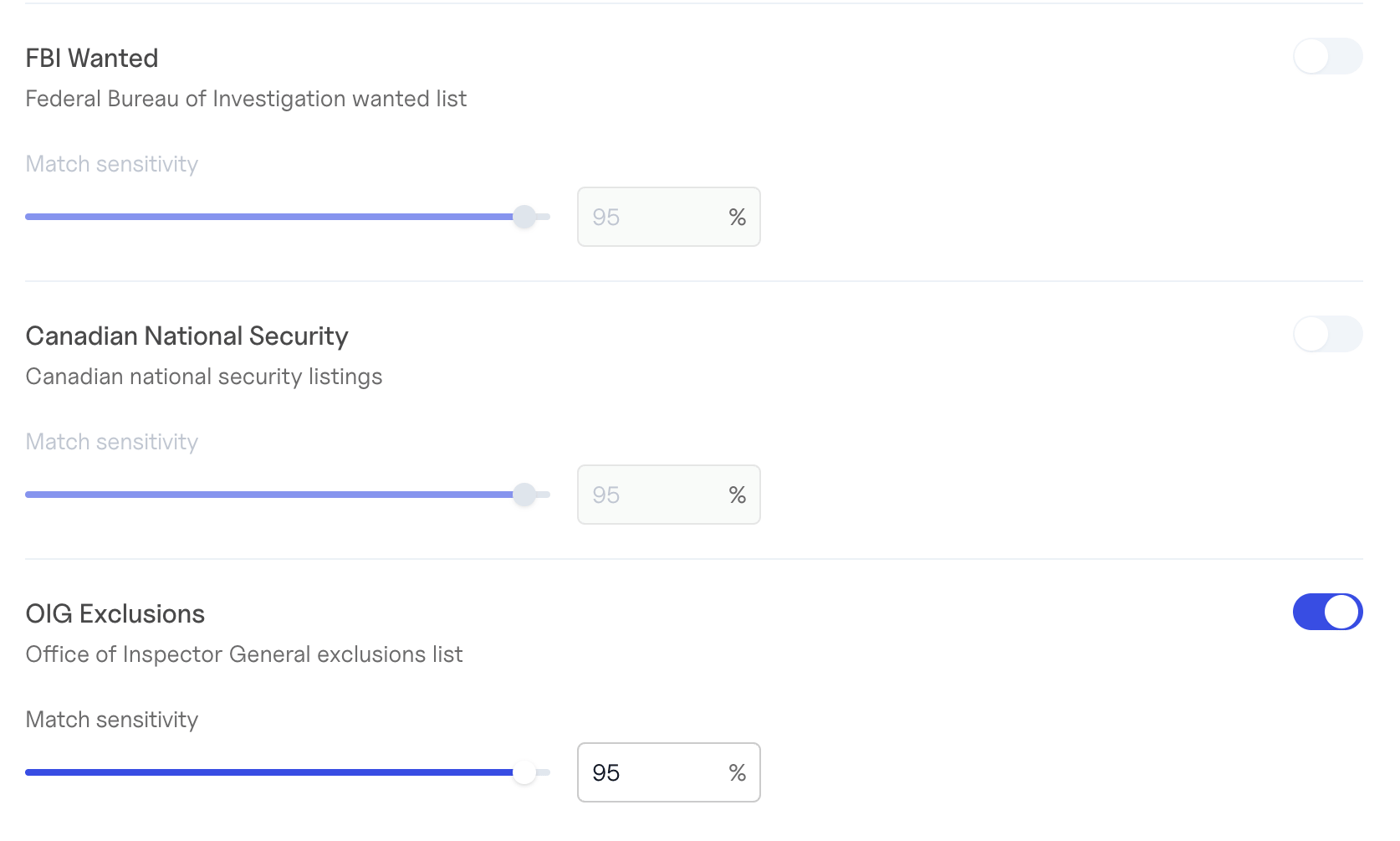
### Watchlist Screening
Choose which screening lists your business searches and international business searches run against, and how close a name has to match before it is reported as a hit.
| List | Full name |
| :- | :- |
| OFAC | Department of Treasury, Office of Foreign Assets Control |
| PEP | Politically Exposed Persons |
| CSL | Department of Commerce, Consolidated Screening List |
| FBI | FBI Wanted List |
| CNS | Consolidated Canadian Autonomous Sanctions List |
| OIG | HHS OIG List of Excluded Individuals/Entities |
For each list you can:
* **Turn screening on or off.**
* **Set the match sensitivity** (similarity threshold) — the minimum name similarity, as a percentage, for a match to be reported. A higher percentage returns fewer, more exact matches; a lower one catches more spelling variations but returns more potential false positives to review.
By default every list is on, with a 95% similarity threshold.
 A few things to know:
* The threshold applies to the names you submit in a search. Hits on the shared business profile (`business.watchlist_hits`) are always screened at the 95% default, although lists you turn off are hidden there too.
* A list you turn off is absent from `watchlist_hits`, rather than shown with a `count` of 0.
* [Standalone watchlist checks](/docs/watchlists-sanctions-standalone-checks) don't use these settings — you set the threshold on each request instead.
Turning a list off means your searches will not report hits from it. Confirm any change with your compliance team before saving.
***
### Lien Matching
By default, lien searches return liens whose debtor name exactly matches the business. You can opt in to looser matches, each of which surfaces more liens — including some that may belong to a different business:
| Option | What it adds |
| :- | :- |
| Alternative names | Liens filed under the business's alternative names, such as DBAs |
| Suffix mismatches | Names that are identical except for the legal suffix (e.g. "Acme Holdings Inc" and "Acme Holdings LLC") |
| Fuzzy matches | Names with typos or small spelling variations (e.g. "Acme Holdngs LLC" and "Acme Holdings LLC") |
| Collapsed initialisms | Initialisms written with or without spaces (e.g. "F B I Headquarters" and "FBI Headquarters") |
Every option is off by default, so your results don't change unless you turn one on.
***
### Going Back to the Defaults
To undo your changes, select **Reset to default settings** at the bottom of the Settings tab. Your organization returns to Baselayer's defaults for every setting on the page.
***
### Related
* [Watchlists & Sanctions: Basics](/docs/watchlists-sanctions-basics)
* [Lien Search: Basics](/docs/lien-search-basics)
This documentation is built and hosted on [Mintlify](https://mintlify.com), a developer documentation platform.
A few things to know:
* The threshold applies to the names you submit in a search. Hits on the shared business profile (`business.watchlist_hits`) are always screened at the 95% default, although lists you turn off are hidden there too.
* A list you turn off is absent from `watchlist_hits`, rather than shown with a `count` of 0.
* [Standalone watchlist checks](/docs/watchlists-sanctions-standalone-checks) don't use these settings — you set the threshold on each request instead.
Turning a list off means your searches will not report hits from it. Confirm any change with your compliance team before saving.
***
### Lien Matching
By default, lien searches return liens whose debtor name exactly matches the business. You can opt in to looser matches, each of which surfaces more liens — including some that may belong to a different business:
| Option | What it adds |
| :- | :- |
| Alternative names | Liens filed under the business's alternative names, such as DBAs |
| Suffix mismatches | Names that are identical except for the legal suffix (e.g. "Acme Holdings Inc" and "Acme Holdings LLC") |
| Fuzzy matches | Names with typos or small spelling variations (e.g. "Acme Holdngs LLC" and "Acme Holdings LLC") |
| Collapsed initialisms | Initialisms written with or without spaces (e.g. "F B I Headquarters" and "FBI Headquarters") |
Every option is off by default, so your results don't change unless you turn one on.
***
### Going Back to the Defaults
To undo your changes, select **Reset to default settings** at the bottom of the Settings tab. Your organization returns to Baselayer's defaults for every setting on the page.
***
### Related
* [Watchlists & Sanctions: Basics](/docs/watchlists-sanctions-basics)
* [Lien Search: Basics](/docs/lien-search-basics)
This documentation is built and hosted on [Mintlify](https://mintlify.com), a developer documentation platform.